Opaque Tokens
Document Metadata
Category: Setup & Configuration → Integrations → Opaque Tokens
Audience: Administrators, Engineers, Support Team
Difficulty: Intermediate to Advanced
Time Required: 15–30 minutes
Prerequisites: ConnexCS account with Integrations permissions, and a basic understanding of API authentication and access tokens
Related Topics: API Integrations (for token usage)
Next Steps: API Usage Guide, API Integration Setup
Setup Integrations Opaque Tokens
Introduction
Opaque tokens are authentication tokens used to securely authenticate API requests and other supported ConnexCS integrations.
Unlike JSON Web Tokens (JWTs), opaque tokens do not contain readable information such as user details, permissions, expiration claims, or other authentication data. The token acts as a unique reference that ConnexCS uses to identify and validate the associated authentication session or authorization.
Note: ConnexCS has retired the previous OAuth and JWT-based token management flow. Opaque tokens are now used for all supported token-based authentication.
What Are Opaque Tokens?
An opaque token is a randomly generated string that does not contain information that can be interpreted by the client.
It functions as a lookup key: ConnexCS's servers hold the actual authentication record, and the token is simply the reference used to retrieve it.
For example:
Authorization: Bearer <opaque-token>
The token itself does not reveal:
- User information
- Permissions/scope
- Account details
- Token claims
- Authentication context
- Other internal configuration information
When a request containing the token reaches ConnexCS, the platform validates the token server-side and determines the account, permissions, validity, and other information associated with it.
Opaque Token vs JWT
| Feature | Opaque Token | JWT (Retired) |
|---|---|---|
| Token format | Random string | Structured token |
| Contains readable claims | No | Yes |
| Client can decode token contents | No | Yes |
| Server-side validation | Yes, on every request | Typically signature-based, local |
| Token contents exposed to client | No | Encoded claims are visible |
| Revocation | Immediate, server-controlled | Requires additional server-side controls; valid until natural expiry otherwise |
| Requires JWT signing keys | No | Yes |
| Suitable for API authentication | Yes | Yes |
How Opaque Tokens Work
The authentication process uses the token as a secure reference rather than embedding authentication information directly in the token.
-
Token Creation: An authorized user or administrator creates an opaque token through the ConnexCS interface. The platform generates a unique, random token string.
-
Token Storage: The token is used as an authentication credential. The associated authentication information (account, scope, expiry, etc.) is maintained by ConnexCS rather than being encoded into the token itself.
-
API Request: The client includes the token in the HTTP
Authorizationheader when making an authenticated API request:Authorization: Bearer <opaque-token> -
Token Validation: ConnexCS validates the supplied token against its server-side records (a process known as introspection). If the token is valid and active, the request is authenticated and the associated scope is applied. If the token is invalid, expired, revoked, or otherwise unavailable, the request is rejected.
-
Token Revocation: An opaque token can be revoked when it is no longer required or if it is suspected of being compromised. Once revoked, the token can no longer be used for authentication — revocation takes effect immediately, since ConnexCS is the single source of truth for the token's validity.
How to Add an Opaque Token
- Login to your account.
- Navigate to Setup Integrations Opaque Tokens.
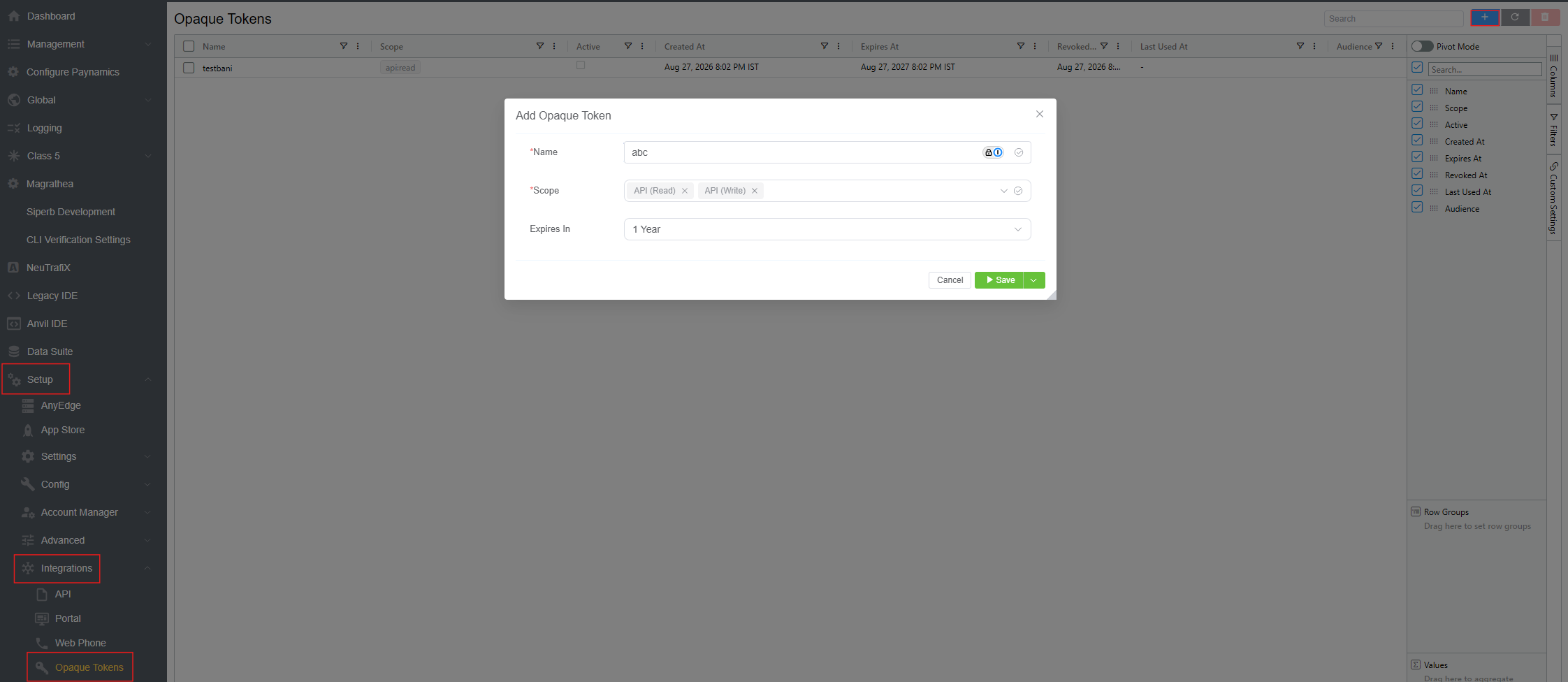
- Click on the blue
+button, located at the top-right corner of the page. This opens the Add Opaque Token window. - Fill in the following fields:
- Name: A required, descriptive label for the token (e.g., the integration or application it's issued for). This is used to identify the token later in the token list — it doesn't affect authentication.
- Scope: A required, multi-select field defining what the token is permitted to do. For example,
API (Read)grants read-only access, whileAPI (Write)grants write access. Add or remove scopes as tags; only grant the minimum scopes the integration actually needs. - Expires In: An optional dropdown to set the token's lifetime (e.g., 30 days, 90 days, 1 year). Use the shortest practical lifetime for the integration.
- Click
Saveto generate the token, or use the dropdown arrow next toSavefor additional save options. - The new token appears in the Opaque Tokens list. The raw token value is only shown once, at creation — copy it into your application's configuration immediately, since it cannot be retrieved again afterward.
Security Notice: Treat an opaque token as a credential. Anyone who obtains an active token may be able to authenticate to the resources and services permitted by that token.
Token Fields
The Opaque Tokens list displays information used to create, manage, and audit tokens. Columns can be toggled on or off via the Columns panel (side tab on the right of the list):
- Name: The descriptive label you gave the token when it was created.
- Scope: The permission(s) granted to the token (e.g.,
api:read). - Active: A checkbox indicating whether the token is currently valid and usable. An unchecked box means the token is inactive or has been revoked.
- Created At: The timestamp when the token was issued. Useful for tracking the token's age and supporting security auditing.
- Expires At: The date and time the token becomes invalid. After this time, requests using the token are rejected.
- Revoked At: The timestamp the token was manually invalidated, if applicable. A revoked token cannot be used for authentication.
- Last Used At: The most recent time the token was used to authenticate a request. Helps identify active and inactive tokens and investigate unexpected token usage.
- Audience: Identifies the intended recipient of the token — the specific service, application, or API the token was issued for. This ensures a token generated for one integration isn't inadvertently accepted by another.
From the same Columns panel, toggling Pivot Mode lets you reorganize the token list into a pivot-table view, grouping and summarizing tokens by any of the fields above (for example, counting tokens by Scope or Audience) instead of viewing them as a flat list.
Important: Because an opaque token does not contain readable claims, its value should be treated as a secret. Do not include tokens in source code, documentation, screenshots, tickets, chat messages, or publicly accessible repositories.
Security Best Practices
- Store Tokens Securely: Store tokens in a secure secrets-management system or protected environment variable. Do not store tokens directly in application source code.
- Use HTTPS: Always transmit authentication tokens over HTTPS. Never send authentication tokens over an unencrypted connection.
- Limit Token Lifetime: Use the shortest practical token lifetime for the integration. Long-lived tokens should only be used when required by the integration's operational requirements.
- Limit Scope: Grant only the scopes (
API (Read),API (Write), etc.) the integration actually needs. - Revoke Unused Tokens: Periodically review token usage (via Last Used At) and revoke tokens that are no longer required.
- Rotate Compromised Tokens: If a token may have been exposed, revoke it immediately and create a replacement token.
- Avoid Logging Tokens: Applications should not write complete token values to application logs, error messages, monitoring systems, or support tickets. If token-related activity must be logged, use a non-sensitive identifier or masked representation.
Summary
Opaque tokens provide ConnexCS integrations with a simple, secure token-based authentication mechanism. Unlike JWTs, opaque tokens do not expose authentication claims or user information to the client — ConnexCS validates the token server-side and determines whether the associated authentication context is valid.
Administrators should securely store tokens, monitor their usage via Last Used At, use appropriate scopes and lifetimes, and revoke tokens that are no longer required or may have been compromised.